> ## Documentation Index
> Fetch the complete documentation index at: https://docs.bluprynt.com/llms.txt
> Use this file to discover all available pages before exploring further.
# Bluprynt Passport
> The issuer workspace for KYI, Proof of Collateral and disclosures.
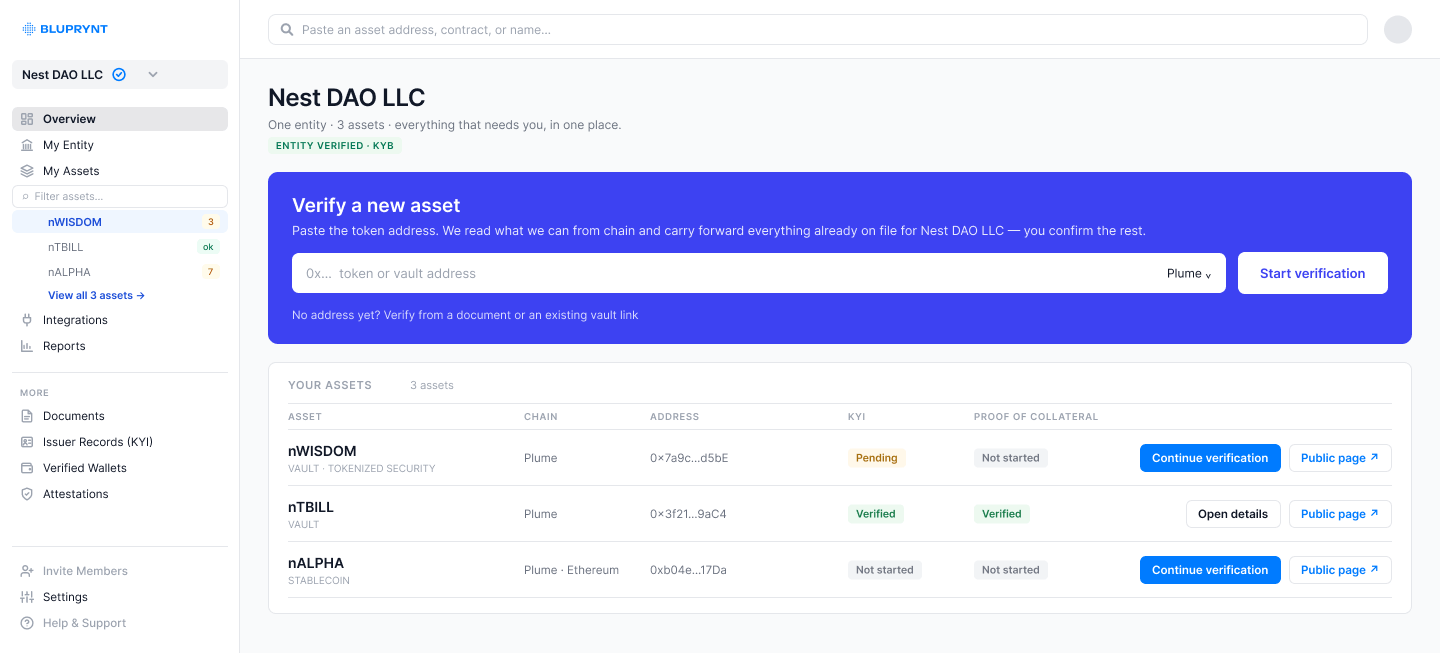 Bluprynt Passport, at [app.bluprynt.com](https://app.bluprynt.com), is where an issuer proves who it is and what backs its tokens. What you publish here appears on each asset's public page and in the [Public API](/api/public/overview).
## What you can do
| Area | Use it to |
| - | - |
| **Overview** | See every asset and what each one still needs. Start verifying a new asset. |
| **My Entity** | Check the legal entity of record and its KYB status. |
| **My Assets** | Open an asset's trust center: KYI status, Proof of Collateral and composition. |
| **Integrations** | Connect AML screening and smart-contract monitoring providers. |
| **Reports** | Generate entity and asset reports once their prerequisites are met. |
| **Documents** | Draft and publish disclosures such as MiCA white papers. |
| **Wallets** · **Attestations** | Review verified wallets and published KYI attestations. |
| **Analyze** | Check a white paper against MiCA. |
## Get started
[Create an organization](/passport/organization) and invite members.
[Run KYI](/passport/verify-asset) for each token you issue.
[Show what backs the token](/passport/proof-of-collateral).
This documentation is built and hosted on [Mintlify](https://mintlify.com), a developer documentation platform.
Bluprynt Passport, at [app.bluprynt.com](https://app.bluprynt.com), is where an issuer proves who it is and what backs its tokens. What you publish here appears on each asset's public page and in the [Public API](/api/public/overview).
## What you can do
| Area | Use it to |
| - | - |
| **Overview** | See every asset and what each one still needs. Start verifying a new asset. |
| **My Entity** | Check the legal entity of record and its KYB status. |
| **My Assets** | Open an asset's trust center: KYI status, Proof of Collateral and composition. |
| **Integrations** | Connect AML screening and smart-contract monitoring providers. |
| **Reports** | Generate entity and asset reports once their prerequisites are met. |
| **Documents** | Draft and publish disclosures such as MiCA white papers. |
| **Wallets** · **Attestations** | Review verified wallets and published KYI attestations. |
| **Analyze** | Check a white paper against MiCA. |
## Get started
[Create an organization](/passport/organization) and invite members.
[Run KYI](/passport/verify-asset) for each token you issue.
[Show what backs the token](/passport/proof-of-collateral).
This documentation is built and hosted on [Mintlify](https://mintlify.com), a developer documentation platform.